345WIN login works five ways, and all of them lead to the same account as long as your phone is linked. This page explains each method, how to recover a forgotten password and how to fix the login errors players report most.
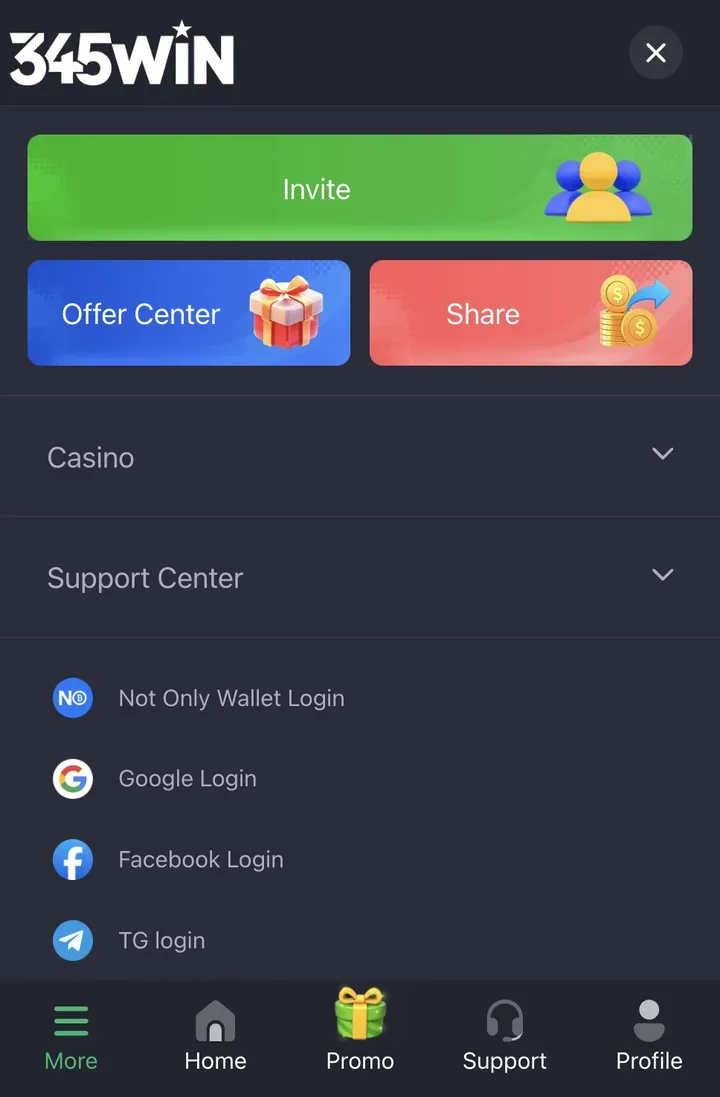
All 345WIN Login Methods
| Method | Where to find it | Best for |
|---|---|---|
| Phone and password | Login button on the home screen | Everyone, easiest to recover |
| Not Only Wallet Login | More menu | Players who pay with No Wallet |
| Google Login | More menu | Quick sign-in on Android |
| Facebook Login | More menu | Players who registered through Facebook |
| TG login | More menu | Telegram users |
Log In With Phone and Password
- Open the official 345WIN page or the app.
- Tap Login.
- Enter your number after +92 without the first zero.
- Type your password and tap Login.
- Check Profile to confirm your balance and check-in card.
Forgot Your Password
- Tap Login, then the forgotten password option.
- Enter your linked +92 number and receive the code by SMS.
- Type the code only inside the 345WIN app. Never send it to anyone.
- Set a new strong password.
- If your phone was never linked, contact 345WIN live support with your user ID.
More detail is in our password recovery article.
Common Login Problems
| What you see | What to do |
|---|---|
| Site will not open | Use another home URL saved from the Find us panel, or the app |
| Wrong password | Check there is no leading zero after +92, then reset the password |
| Social login opens an empty account | You signed up with a different method; use that one |
| Account locked | Contact support from inside the app with your user ID |
| Code not received | Wait 60 seconds, check signal, then request again once |
Keep Your Account Safe
- Link your phone number in Profile.
- Use a password you do not use anywhere else.
- Never share OTP codes, even with “agents”.
- Log out on shared phones.
Log In on a New Phone
- Install the app from the official page or open the site in your browser.
- Use phone and password if your number is linked.
- If you only used Google or Telegram before, use the same method again.
- Confirm your balance and check-in history look right.
- Log out of the old phone if you no longer use it.
Stay Logged In Safely
Staying logged in on your own phone is convenient and fine. On a shared phone, always log out and do not let the browser save your password. If you lose a phone, change your 345WIN password from another device straight away and ask support to end old sessions if needed.
Login and Rewards
Several rewards depend on logging in: the daily check-in, monthly login events such as November Login Rewards and the “Login to the APP (first deposit)” task. Logging in inside the app rather than the browser is what counts for the app task.
Frequently Asked Questions
Which 345WIN login method is safest?
Phone number and password with the phone linked to the account.
Can I use Google and phone login on the same account?
Yes, once the phone number is linked to that account.
Why does the app say bind your phone first?
Some functions such as withdrawals need a linked phone. Tap Link Now and finish the binding.
18+ only. Every 345WIN reward carries conditions and real-money play can lose money. Read our responsible gaming page before you deposit.
Opens the official 345WIN download page. Live chat is open 24 hours if you get stuck.